Recording what a job cost, and the Project Net line
Under the Received table, a project's Payments tab has two ledgers for money going out on the job.
On this page
- Paid is money paid to someone for the job, such as a crew or a subcontractor, with a reference number, an account type and an Is Paid tick for whether it has actually been paid yet.
- Additional Project Expenses is any other cost on the job, such as a dumpster or a permit.
Both are added with Add New Row in their own table, and a row is changed by clicking it. Adding, changing and deleting take Create on Payments, Modify on Payments and Delete on Payments.
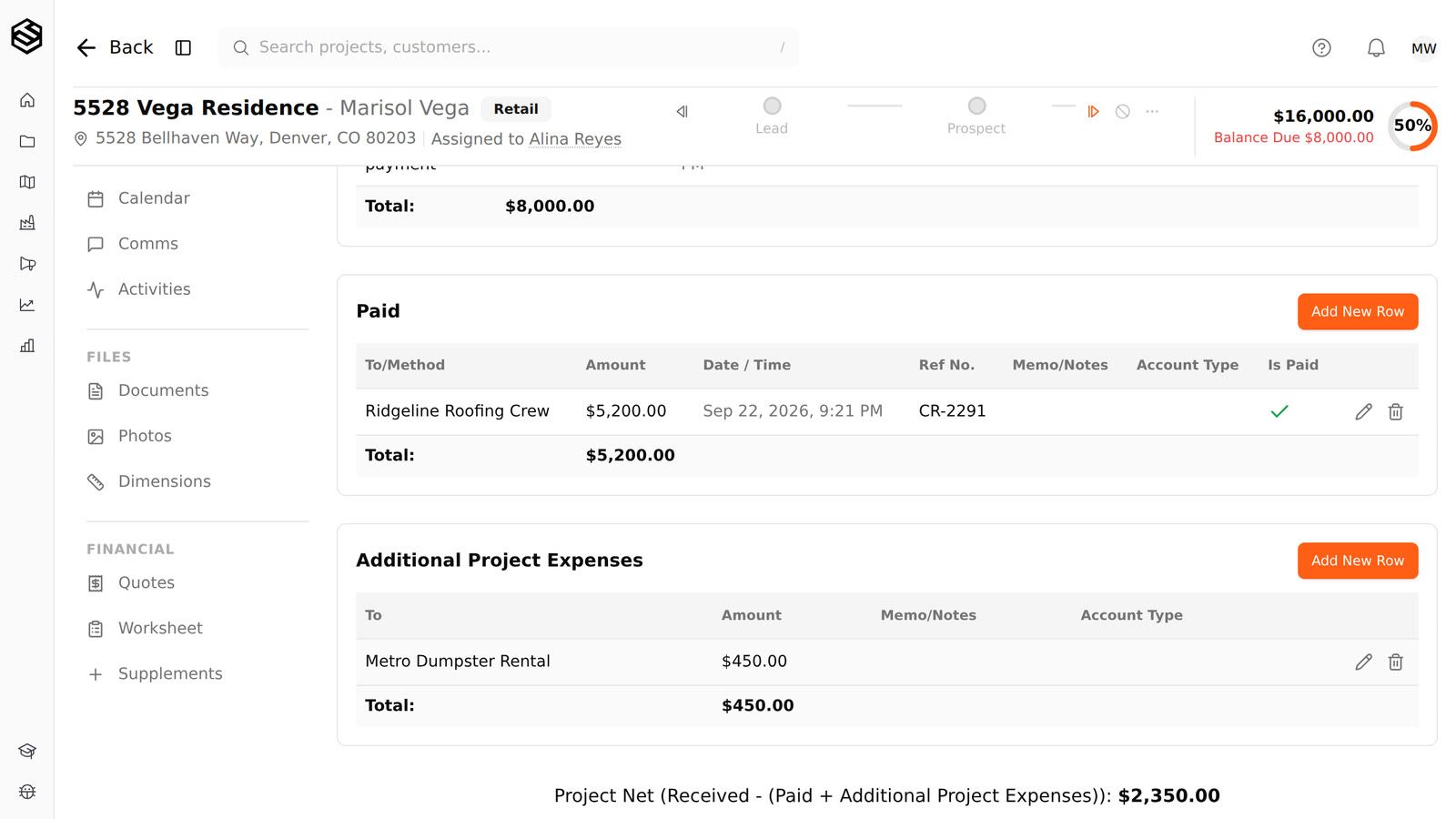
The line at the bottom of the tab is Project Net: received, minus paid, minus additional expenses. On a job with $8,000 received, a $5,200 crew payment and a $450 dumpster, it reads $2,350.00. A negative net is shown in brackets.
Neither ledger changes what the homeowner owes. Balance due only counts the job value and the received payments.
Step by step
- Open the project and go to its Payments tab. Where: the project's Payments tab. Needs View on Payments.
- In the Paid table or the Additional Project Expenses table, press Add New Row. Needs Create on Payments.
- Enter who it went to and the amount, plus a reference number and memo if you have them. For a Paid row, tick Paid once the money has actually gone out.
- Press Save. The row is added to its table and Project Net at the bottom of the tab updates.
Who can do this
Access in Trussi is a capability granted to a role. If one of these is missing from your role, an account admin can grant it; see roles, permissions and why something is hidden.
- Create on Payments
- Modify on Payments
- Delete on Payments
- View on Payments
Was this article helpful?
Related articles
- Recording a check or cash payment by handA payment that did not go through Trussi's online payments, such as a check handed over at signing or cash on completion, is recorded by hand on the project's Payments tab.
- Invoices, payments and accountingThe project's Payments tab holds payments received, payments paid, additional expenses, and the project's invoices, with received payments able to be tied to a specific invoice.
- Giving a homeowner money back with a creditA credit is how you record money going back to a homeowner: a refund, an overpayment you returned, or a payment you are taking back because it was entered by mistake.
- Taking a full or partial payment onlineA homeowner can pay part of a job's balance, such as a deposit, a percentage of the job or whatever the insurance check covers, and the rest stays on the balance due for the next payment.